Send Files Between Any Two Devices. No App. No Cable. No Ecosystem Lock-In.
· 7 min readYou're sitting in a meeting with your MacBook. Your colleague pulls out their Android phone and says "let me send you those photos from the site visit." And then it starts — the awkward dance.
AirDrop? Only works if they have a Pixel 9 or 10 with the new interop — most Android phones still can't. Quick Share? No Mac app. Bluetooth? Sure, if you've got twenty minutes to transfer six photos. Email? Great, until you hit the 25 MB attachment limit. Cloud upload? Now you're both waiting for upload and download, and those photos are sitting on someone else's server.
Every major tech company has built a file sharing tool. And every single one of them has gaps the moment you cross ecosystem boundaries.
The Ecosystem Problem
Apple launched AirDrop on Mac in 2011, then brought it to iPhone in 2013. It works beautifully — between Apple devices. In late 2025, AirDrop interop with Android launched on the Pixel 10 (thanks to EU regulations), and it's expanding to more phones in 2026. But it still doesn't work on Windows or Linux.
Google shipped Nearby Share (now Quick Share) in 2020. Android to Android, great. Android to Chromebook, solid. Android to Windows, decent once you install the app. And the new AirDrop interop lets Pixel phones send to iPhones and Macs. But there's no official Mac or Linux app — only third-party open-source clients.
Microsoft has Nearby Sharing in Windows. It talks to other Windows machines. Samsung's Quick Share merged with Google's in early 2024, unifying the Android experience.
Things are improving, but every tool still has gaps. AirDrop doesn't cover Windows or Linux. Quick Share doesn't have an official Mac or Linux app. None of them work over the internet. The moment your office has a mix of devices and locations (which is always), they all have blind spots.
What Actually Works Across Everything
The one piece of software that runs on every device you own is the browser. Chrome on Android, Safari on iPhone, Firefox on Linux, Edge on Windows, Safari on Mac — every modern browser speaks the same language.
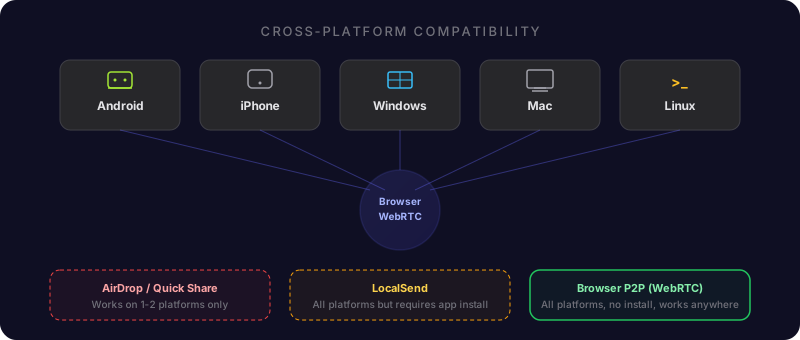
WebRTC is a protocol built into all of these browsers. Originally designed for video calls, it creates direct encrypted connections between any two browsers, regardless of what operating system or device they're running on. No plugin. No app install. No account.
This is what makes truly cross-platform file sharing possible. If both devices have a browser, they can connect directly and transfer files. The operating system underneath doesn't matter.
Common Scenarios That Used to Be Painful
Here's what cross-device file sharing actually looks like in practice.
Android Phone to MacBook
The single most common cross-platform transfer people need to make, and probably the worst-supported by native tools.
Before: Email yourself the files (size limits), upload to Google Drive then download on Mac (slow, touches cloud servers), or connect a USB cable (who carries those anymore?).
Now: Open DirectFileTransfer on both devices. Share the room link or scan the QR code. Files transfer directly over your WiFi connection. If both devices are on the same network, the data never touches the internet. A batch of 200 photos moves in under a minute on a decent WiFi connection.
iPhone to Windows PC
Apple devices actively resist talking to Windows. iTunes is technically an option, but nobody should have to install iTunes in 2026 to move a few files.
iCloud for Windows exists but requires an account, installs a background service, and syncs entire folders when you just want to send one file. OneDrive works if you have Microsoft 365 on both devices, but that's a subscription.
With browser-based P2P transfer: open the site on both devices, connect, send. The iPhone's Safari works perfectly with WebRTC. No app needed, no account, no subscription.
Work Laptop to Personal Phone
This is the one that corporate IT departments make especially difficult. Your work laptop probably has restrictions on USB drives, Bluetooth might be disabled, and installing apps requires admin approval.
But you can open a website. Browser-based file transfer works within whatever restrictions your IT department has set, because it's just a web page making a direct connection. No software installation, no admin privileges, no policy violations.
Linux Desktop to Anything
Linux users have always been the afterthought. AirDrop? No. Quick Share? No official Linux app — there's a third-party open-source client (RQuickShare), but nothing from Google. Most cloud sync apps either don't have Linux versions or lag behind their Windows and Mac counterparts.
Browser-based transfer treats Linux as a first-class citizen. Firefox or Chrome on Ubuntu connects to Safari on an iPad the same way Chrome on Windows connects to Chrome on Android. The browser is the great equalizer.
Why Same-Network Transfers Are a Big Deal
When you're sending files between two devices in the same room, the fact that the data stays local matters more than people realize.
With cloud-based transfers (even "fast" ones like WeTransfer or Google Drive), your file takes a round trip: from your device, up to a data center that could be hundreds of miles away, and back down to the device sitting three feet from you. You're paying for that round trip in speed, and the cloud provider gets a copy of your data as a bonus.
WebRTC detects when both devices share a local network and routes traffic directly between them — device to router to device, nothing else. On a home WiFi network, this means a 1 GB video file transfers in about 30 seconds. On a wired office network, more like 10 seconds.
Your ISP doesn't see it. No cloud server stores it. It physically stays in the room.
The Comparison Nobody Wants You to See
Browser-based P2P is the only method that works across every combination, requires no accounts or installs, and transfers at full network speed.
What About Large Files?
This is where the differences become stark. Most of the workarounds people use for cross-platform sharing have aggressive size limits.
Email caps out at 25 MB. WhatsApp compresses everything and limits file size. Cloud services impose upload limits on free tiers — Google Drive gives you 15 GB total storage, and most file sharing services cap individual transfers at 2-5 GB unless you pay.
P2P browser transfer has no file size limit. The data goes directly between devices — there's no server storage to run out of. We've seen users transfer 100+ GB database exports, multi-gigabyte video projects, and massive photo libraries without hitting any ceiling.
The practical limit is your patience and your network speed, not an arbitrary restriction imposed by a service.
Making It Work: Practical Tips
Same WiFi network = fastest transfer. If both devices are on the same WiFi, traffic routes locally and you'll see the best speeds. This is the ideal setup for office and home transfers.
Scan the QR code for phone-to-laptop. Instead of typing a URL on your phone, open DirectFileTransfer on your laptop, show the QR code, and scan it with your phone's camera. Instant connection.
Keep the browser tab active on mobile. Phones aggressively suspend background tabs to save battery. During a transfer, keep the browser tab in the foreground. The wake lock feature helps, but staying on the tab is the most reliable approach.
Use the 8-digit PIN for phone calls. If you're walking someone through a transfer over the phone, the PIN is easier to dictate than a URL. They enter it on the site and connect to your room instantly.
One Browser to Rule Them All
The tech industry spent the last decade building walled gardens around file sharing. Apple locked it to Apple. Google locked it to Google (mostly). Microsoft locked it to Windows. Samsung locked it to Samsung.
The browser was there the whole time, running on everything, capable of direct encrypted connections between any two devices. WebRTC gave it the power to transfer files at full network speed without touching a cloud server.
The next time someone asks you "how do I send this file from my Android to your Mac?" — the answer isn't an app, a cable, or a cloud service. It's a URL.