Is It Safe to Share Files Over Public WiFi?
· 5 min readYou're at a coffee shop. Your client just asked for that proposal. It's 500 MB, too large for email. You pull out your laptop, connect to the cafe WiFi, and pause. Is this safe?
The short answer: it depends entirely on what tool you use. The long answer is more interesting — because most people's mental model of public WiFi security is about ten years out of date.
What's Actually Dangerous on Public WiFi
First, let's clear up a common misconception. In 2026, most of the scary "public WiFi attacks" from a decade ago are much harder to pull off. HTTPS is everywhere. Your browser encrypts traffic to any site with a padlock icon. Someone sitting next to you at Starbucks can't easily read your Gmail or see your Facebook password.
But file sharing is different from browsing. Here's what can still go wrong:
Unencrypted transfers — If you use a tool that doesn't encrypt the file data (old FTP, some basic file sharing apps, Bluetooth), anyone on the network can intercept the contents. This is rare with modern tools, but some older or badly-built apps still do this.
Man-in-the-middle attacks — A sophisticated attacker can position themselves between you and the WiFi router, intercepting traffic. Against basic HTTPS this is hard. Against tools with weak certificate validation, it's possible.
DNS spoofing — The attacker redirects you to a fake version of the file sharing service. You think you're uploading to Google Drive, but you're actually sending files to their server. Modern browsers and HSTS headers mitigate this, but it's still a risk on networks that force you through a captive portal.
The network operator — This is the one people forget. The coffee shop, airport, or hotel running the WiFi can see unencrypted traffic. Many public WiFi providers explicitly state in their terms that they may monitor network activity.
Cloud Upload on Public WiFi: The Hidden Risk
When you upload a file to Google Drive or WeTransfer from a coffee shop, the connection to their servers is encrypted with HTTPS. Nobody on the WiFi can read the file in transit. So far, so good.
But your file now sits on that cloud provider's servers. It's decrypted on their end (they need to store it). If the provider gets breached, or a rogue employee accesses it, or a government requests it — your file is exposed. This isn't a public WiFi problem specifically, but people tend to be less careful about what they upload when they're in a rush at an airport.
The real risk with cloud services on public WiFi isn't the network — it's the destination. You're sending your file to a third party, and once it's there, you've lost control.
How P2P File Transfer Handles Public WiFi
Peer-to-peer file transfer over WebRTC is actually one of the safest ways to share files on an untrusted network. Here's why.
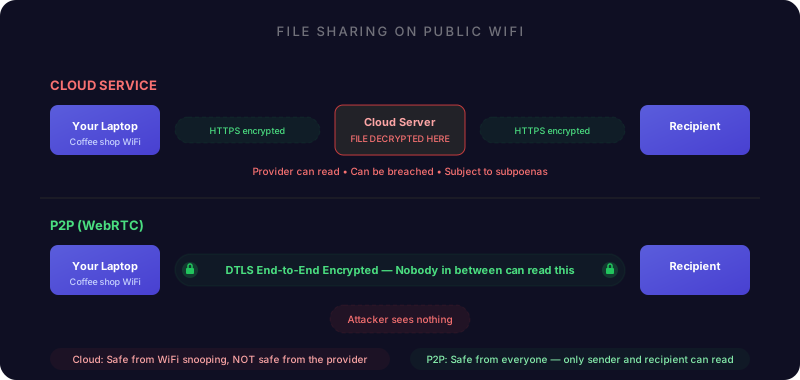
Built-in encryption — WebRTC encrypts all data using the same class of cryptography that secures online banking. This isn't optional — it's built into the protocol. Every WebRTC connection is encrypted end-to-end, even on a compromised network.
No server-side decryption — Unlike cloud services, a P2P transfer never decrypts your file on a server. The encryption keys only exist on your device and the recipient's device. There's no middleman that could be compromised.
Connection verification — WebRTC connections verify that both sides are who they claim to be using cryptographic certificates. A man-in-the-middle attacker can't insert themselves into the encrypted connection without both sides noticing.
Perfect Forward Secrecy — Each P2P session generates unique encryption keys that are never stored. Even if someone records all the encrypted traffic and later tries to crack it, each session's keys are independent. Breaking one session doesn't compromise any other.
What About the Signaling Server?
Fair question. P2P tools need a signaling server to help two devices find each other. This signaling traffic goes through a server — so what does it see?
The signaling server sees basic connection metadata — just enough to help two devices find each other. It does not see file names, file contents, or file sizes. The actual file data travels directly between devices, encrypted end-to-end.
Think of it like a phone operator connecting a call in the 1950s. They can see who's calling whom, but once the connection is made, they can't hear the conversation.
On public WiFi, the signaling traffic is also encrypted (HTTPS), so other people on the network can't even see the metadata.
Practical Tips for Sharing Files on Untrusted Networks
Use tools with end-to-end encryption. WebRTC-based P2P tools (like DirectFileTransfer) encrypt everything between devices. Cloud services encrypt to their servers but decrypt there — not the same thing.
Verify who you're connected to. On public WiFi, someone could try to join your transfer room before the intended recipient. Tools with sender approval let you verify the other person before any file data moves.
Avoid unencrypted protocols. Don't use FTP, SMB file shares, or Bluetooth for sensitive files on public networks. If the tool doesn't explicitly say "end-to-end encrypted," assume it's not.
Use HTTPS everywhere. Make sure the site you're using shows the padlock icon. Better yet, use a tool you navigate to directly rather than clicking a link from an email (which could be spoofed).
Skip the VPN for P2P transfers. This is counterintuitive. VPNs encrypt your traffic to the VPN server — useful for browsing, but P2P transfers are already encrypted end-to-end. Adding a VPN just adds latency and may force the connection through a relay server instead of going direct. WebRTC uses the same class of modern cryptography found in leading VPN protocols.
The Comparison
The only method where nobody except you and the recipient can access the file — not the network operator, not the service provider, not anyone — is end-to-end encrypted P2P.
So, Is It Safe?
Sharing files over public WiFi is safe if your tool encrypts everything end-to-end. WebRTC-based P2P transfer does this by default — it was designed to work on untrusted networks.
Cloud upload services encrypt the connection to their servers but decrypt your file there. It's safe from the person at the next table, but not from the service itself or anyone who compromises it.
The safest approach on public WiFi: use a P2P tool with end-to-end encryption, verify who you're connected to before sending, and skip the cloud middleman entirely. Your file goes from your device to the recipient's device, encrypted the entire way, and nobody in between can read it.