How to Send Large Files Without Uploading to the Cloud
· 6 min readYou've got a 15 GB project folder to send to a client. You open Google Drive, hit upload, and watch the progress bar crawl. Twenty minutes in, it's at 34%. Your upload speed is 20 Mbps — decent by most standards — but that 15 GB file is going on a 400-mile round trip to a Google data center and back. Meanwhile, you're burning your monthly bandwidth.
There's a dirty secret about cloud file sharing that nobody talks about: your file doesn't need to go to the cloud at all. The detour through someone else's servers isn't a technical requirement — it's a business model.
Why Cloud Uploads Are Slower Than They Should Be
When you upload a file to Google Drive, Dropbox, WeTransfer, or any cloud service, here's what actually happens:
- Your file travels from your device to a data center (upload)
- It sits on their servers, getting indexed, scanned, and stored
- Your recipient downloads it from the data center (download)
That's two full transfers for one file. Your 15 GB file becomes 30 GB of total network traffic. And because most internet connections have much slower upload than download speeds (a 100 Mbps plan might only give you 20 Mbps upload), the upload leg is the bottleneck.
Plus, many cloud services actively throttle speeds on free tiers. WeTransfer's free plan, Google Drive when you're near your storage limit, Dropbox on the basic plan — they all quietly slow you down to push you toward paid plans.
The Alternative: Send Files Directly
Peer-to-peer file transfer skips the cloud entirely. Your file goes straight from your device to the recipient's device. One transfer, not two.
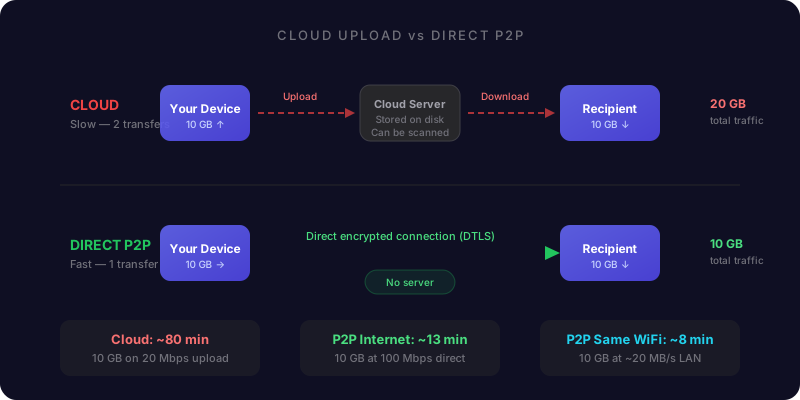
The technology behind this is WebRTC — a protocol built into every modern browser. It creates a direct encrypted connection between two devices. The file travels the shortest possible path. No data center detour, no server storage, no upload-then-download.
On the same Wi-Fi network, it's even better. WebRTC detects when both devices share a local network and routes traffic directly between them — never touching the internet at all. A 15 GB file can move between a phone and laptop on the same Wi-Fi in a few minutes instead of half an hour.
How Much Faster Is Direct Transfer?
Let's do the math with a 10 GB file on a typical home connection (100 Mbps down, 20 Mbps up).
- Cloud upload route:
- Upload 10 GB at 20 Mbps: ~67 minutes
- Recipient download at 100 Mbps: ~13 minutes
- Total: ~80 minutes (plus processing time on their servers)
- Direct P2P transfer (over internet):
- Limited by the slower side's speed: ~13-67 minutes depending on direction
- No double transfer — total data moved is 10 GB, not 20 GB
- Direct P2P transfer (same Wi-Fi):
- WebRTC over WiFi 6 LAN, typically 80-240 Mbps (10-30 MB/s)
- 10 GB: ~6-15 minutes
- Zero internet usage
Same network transfers are where P2P completely dominates. Your file physically stays in the room. Your ISP never sees a byte of it.
But What About File Size Limits?
This is where cloud services really sting.
- WeTransfer free: 3 GB per transfer, 3 GB total per month, links expire in 3 days
- Google Drive free: 15 GB total storage (shared with Gmail and Photos)
- Dropbox free: 2 GB total storage
- OneDrive free: 5 GB total storage
- iCloud free: 5 GB total storage
Want to send a 20 GB video? On most free tiers, you literally can't. You'd need to split the file, upgrade to a paid plan, or find another way.
P2P transfer has no file size limit. The data goes directly between devices — there's no server disk to fill up. We've seen users transfer 100+ GB files without hitting any ceiling. The only limit is your patience and your network speed.
The Privacy Angle Nobody Mentions
When your file sits on Google's or Dropbox's servers, it's not just yours anymore.
Cloud providers scan uploaded files — sometimes for malware, sometimes for copyright violations, sometimes for less clear reasons. WeTransfer updated their Terms of Service in 2025 to claim rights over uploaded content for commercial use and AI training. They reversed course after backlash, but the fact that they tried tells you something about the incentives.
With direct P2P transfer, there's nothing to scan. Your file never touches a third-party server. It's encrypted end-to-end — using the same class of cryptography that secures online banking. Even the transfer service itself can't see your file contents.
For tax returns, medical records, legal documents, unreleased creative work, or anything you'd rather keep private — this matters.
When Cloud Upload Still Makes Sense
Direct transfer isn't always the answer. Cloud storage has legitimate advantages:
- Asynchronous sharing: The recipient doesn't need to be online at the same time as you
- Multiple recipients: Share a link with 20 people without sending the file 20 times
- Long-term storage: Files persist for days or weeks
- Version history: Some services track file changes
If you need someone to grab a file next Tuesday, cloud storage is the right tool. If you need to send a large file to someone who's available right now, direct transfer is faster, cheaper, and more private.
The smart approach is using both. Cloud for async. P2P for real-time.
How to Send Large Files Directly (Step by Step)
If you want to skip the cloud and send a file directly:
- Open a browser-based P2P tool (like DirectFileTransfer) on your device
- Create a room — you'll get a link, QR code, or PIN
- Share the link with your recipient through any channel (text, email, Slack)
- They open the link in their browser — no app install needed
- You approve their connection (so you know who's receiving)
- Select your files and send — they transfer directly
Both devices need to be online at the same time. That's the tradeoff. But for the speed, privacy, and zero file size limit, it's worth it.
For files over 500 MB on Chrome or Edge, the file streams directly to the recipient's disk — it doesn't even load into memory. You can send a 50 GB file without either device breaking a sweat.
The Bottom Line
Cloud uploads made sense when internet speeds were slow and people needed asynchronous access. But in 2026, when you're sending a file to someone who's available right now, routing through a data center hundreds of miles away is just wasteful.
Direct P2P transfer is faster (one trip instead of two), more private (no third-party server), has no file size limits, and costs nothing. The technology has been in your browser for years. The question is why we're still defaulting to cloud uploads when a better option exists.